Infragistics Community Forum / Web / Ignite UI for Angular / Angular infragistic grid customized dropdown filter
Angular infragistic grid customized dropdown filter
New DiscussionH Team,
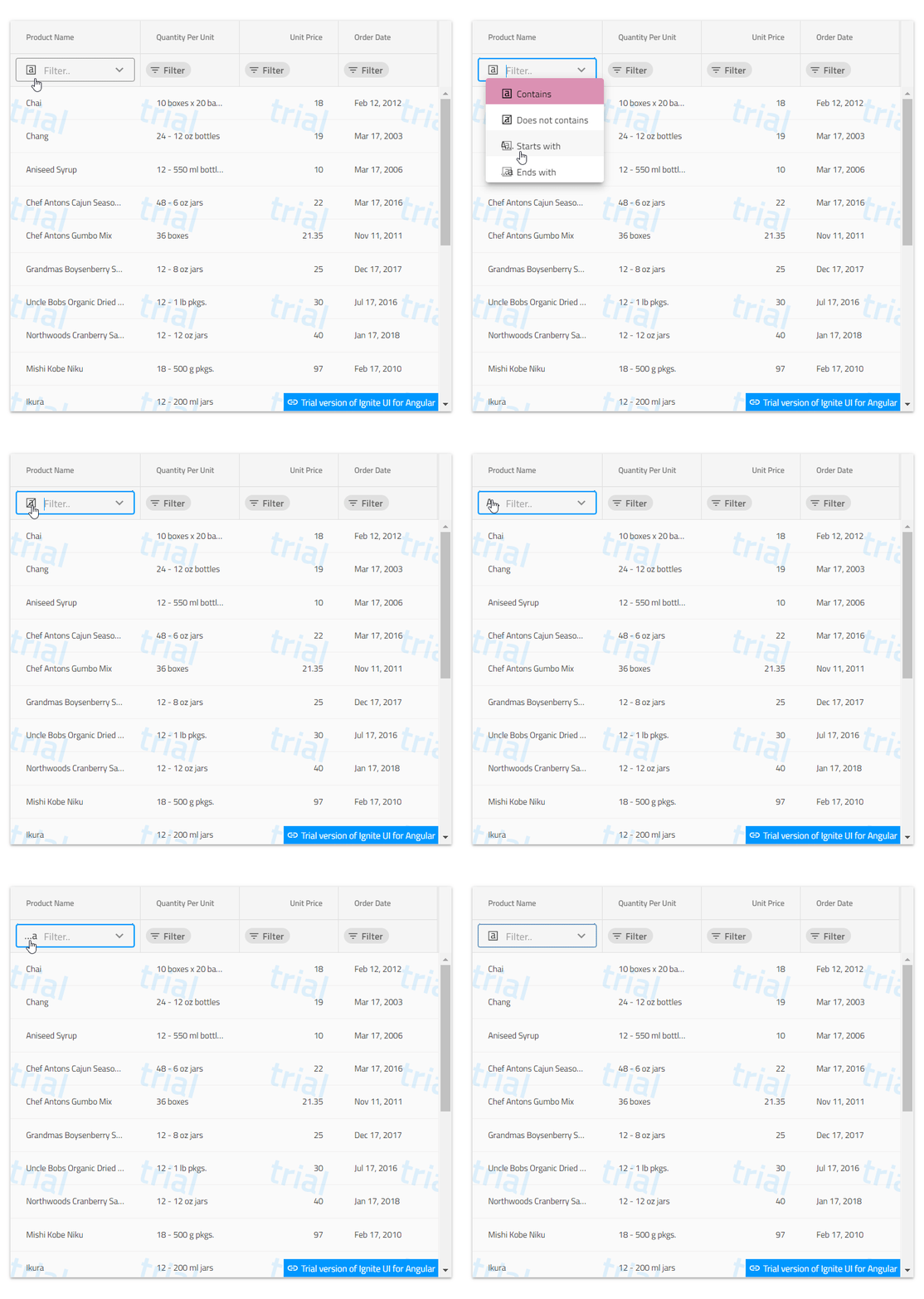
I would like to get help on customized dropdown list in angular grid for filter.
I have attached screen shots.
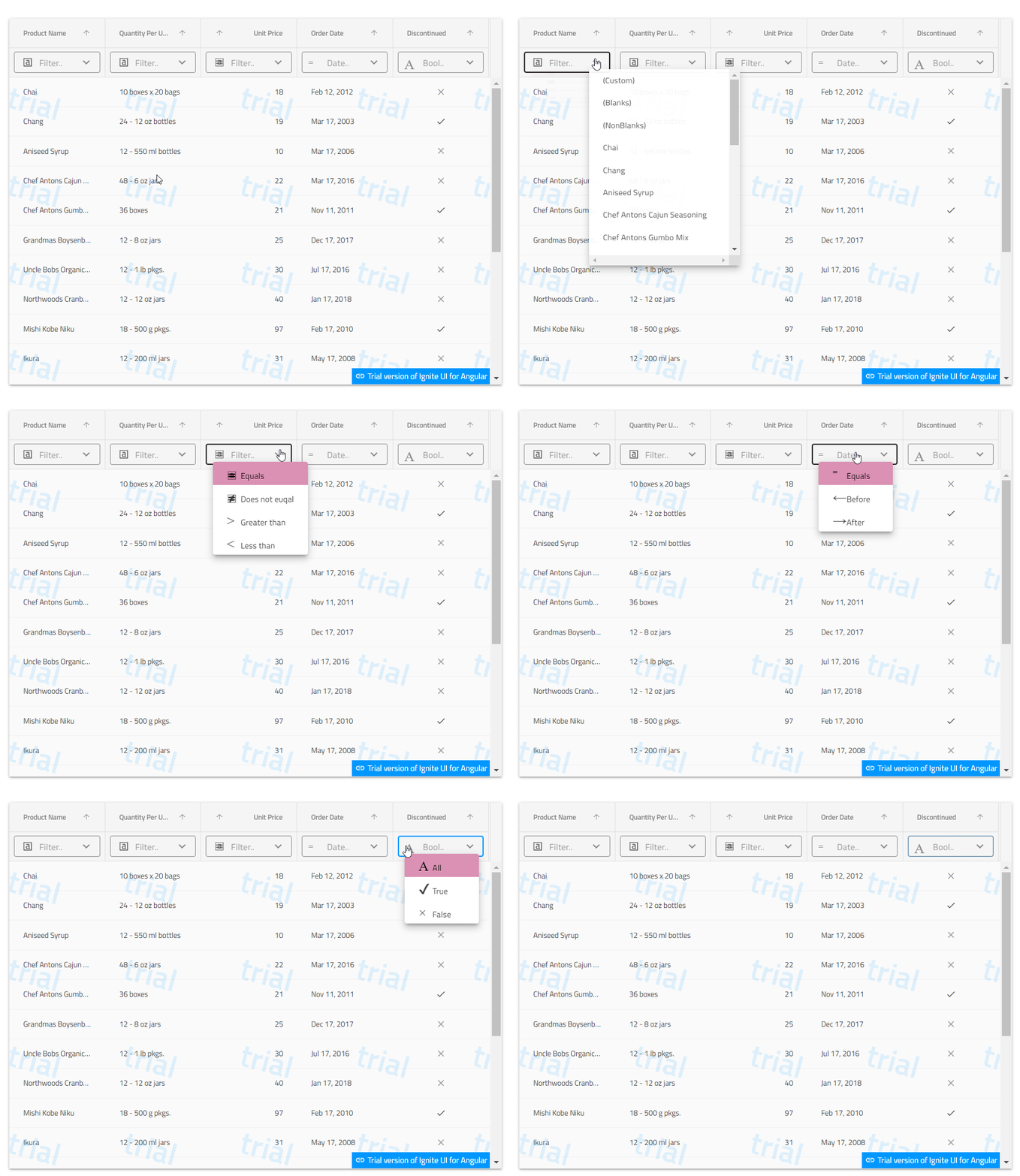
Each column should have dropdown list with filter conditions(contains,greater than,does not contain etc) and unique values listed out in dropdown
- User can search the either by entering in the text box or selecting the unique available records from the respective column dropdowns.
- User can have searching applied to multiple columns by selecting multiple conditions in the given grid. Default condition in all the column should be selected to ‘Contains’
- There should be a ‘X’ mark in every search box to cancel out the given search value
- The dropdown containing the unique values within the given column should always have the below three values embedded at the top along with unique values
- (Custom)
- (Blanks)
- (NonBlanks)
Replies
-
0
Hello Roopesh,
I have been looking into your question and the given requirements are fully present in the already defined filtering feature of the igx-grid component. You could take a look at the Quick Filtering mode, which provides an input field that expands a drop-down list with defined conditions for filtering the grid. You could also take a look at the Excel Style Filtering mode with additional options for filtering and selecting a value from the given column. Additionally, there is another filtering mode too, Advanced Filtering.
However, in order to create your own custom filtering according to these requirements, you have to first enable grid filtering by setting the allowFiltering property to true and handle the filterCellTemplate property of the columns by providing a reference to your custom filtering.
For this purpose, you will create an ng-template element that will have an igxFilterCellTemplate directive and will contain an igx-input-group component for this custom filtering. In the input group, to begin with, you will create an igx-prefix with an igx-icon in it, from where, when clicked, an igx-drop-down component will expand, which will contain the filtering conditions. This will be done with the igxToggleAction directive which will be passed a reference to the drop down.
search {{ condition }} Then you should add an input element with the igxInput directive where given values will be entered and the grid will be filtered. For this purpose, the input event of the input element will be handled and when it is written in the input field during the execution of the event in the function, the filtering condition will be checked, and the grid will be filtered based on it. For this purpose, there are predefined filtering conditions created in the igniteui-angular package, but also additional custom ones could be added.
public onInput(input, column) { let operand = null; if(this.dropdown.selectedItem.index === 0){ operand = IgxStringFilteringOperand.instance().condition('contains'); this.grid1.filter(column.field, input.value, operand, column.filteringIgnoreCase); } }Finally, in the template you will add an igx-suffix that will contain the icon for clearing the input field when there is an entered value in it. You'll also add another igx-suffix that will contain the arrow icon to expand the igx-drop-down component again passing a reference to the igxToggleAction directive that will contain the values from the select column along with additional custom values for your custom logic. The selectionChanging event will be handled on the given dropdown and when a given value is selected from the column, the grid will be filtered by it.
clear igx-icon>expand_more The described scenario could be observed here:

In addition, I have prepared small sample illustrating this behavior which could be found here. According to your requirements, I have templated one column to represent this approach from string datatype, and additionally the other columns can be templated from different datatypes, more and new filter conditions can be added, etc. Please test it on your side and let me know how it behaves.
Additional information about the filtering feature and igx-grid filtering mods could be found in this topic from the Angular documentation.
If you require any further assistance on the matter, please let me know.
Regards,
Georgi Anastasov
Entry Level Software Developer
Infragistics
-
0
Thanks for the quick reply…It would have been better if filter conditions come along with image for ex: > Greater than
and when we select the condition image will be selected in the dropdown. I will check this and let you know
-
0
Hello Roopesh,
Regarding the requirement that each filtering condition have its own unique icon, this can be achieved using the igx-icon component. You could use your own svg icons or other predefined ones, for this purpose IgxIconService is used and with it the icons that can be found locally as well as on the given url are added.
constructor(private iconService: IgxIconService) {}this.iconService.addSvgIcon('contains', 'https://pt-br.infragistics.com/angular-demos-lob/assets/images/svg/contains.svg', 'filter-icons');After that, in the igx-drop-bottom component, which is responsible for expanding the list with the filtering conditions, it will be checked with the *ngIf directive which exact condition is visualized and its unique icon will be added to it.
{{ condition }} {{ condition }} In order for the icon to be visualized in the igx-prefix of the input group again, the *ngIf directive can be used. At the beginning when the page is loaded, contains will be set as a predefined selected condition.
public ngAfterViewInit(): void { this.dropdown.setSelectedItem(0); }After that, the selectionChanging event of the dropdown will be handled, and when a given filtering condition is selected, a boolean flag will be set to show its corresponding unique icon.
public handleSelection(event){ if(event.newSelection.index === 0){ this.contains = true; }else if(event.newSelection.index === 1){ this.doesnotcontains = true; } }The described scenario could be observed here:

I have modified my previous sample illustrating this suggestion which could be found here. Please test it on your side and let me know how it behaves.
More information about the igx-icon component and how to add your own icons can be found in this topic from the Angular documentation.
If you require any further assistance on the matter, please let me know.
Regards,
Georgi Anastasov
Entry Level Software Developer
Infragistics
-
0
I have implemented the changes as suggested by you. It looks great. When I try to implement those changes into more than one column and try to select or search from any of the dropdown it will also select same values from all of other dropdown columns also.
Here I have attached the screen shot
Here I have selected search option "Start With" from first column, But Same time second column also auto selected with first column search selection
Can you please hlep me to resolve this
-
0
Hello Roopesh,
After further investigation what I could say is that this is expected behavior since you are most likely using the same template for the next column and it is due to the two-way data binding of the input field itself. The two-way data binding on the input field is used because of the requirement to select a specific value from the given column.
Precisely because of the specific requirements for creating custom filtering and selecting a value from the given column, different condition based on each column data type, as well as changing icons for each field, in this case separate custom filterings must be created for each column.
What I could suggest you is to create a separate custom filtering template in the same way with an ng-template tag and its own reference, which contains an input group, also with the input field with different two-way data binding as well as igx-prefixes and igx-suffixes for the igx-icons which toggles the different drop-downs. As each custom filtering will use a different dropdown for the conditions according to the datatype of the column and a different dropdown to select the different values of each different column. Both column dropdowns will again handle the selectionChanging event as before, but will perform a different function depending on the column.
I have modified my previous sample and what I did is to add a separate custom filtering template for the next string type column as well as a custom filtering template for the number type column for your further reference and understanding, the filtering templates are identical and only the icons, conditions and functions that are executed when the events fire are changed.
The described scenario could be observed here:

Here you could find the sample which illustrate this scenario. Please test it on your side and let me know how it behaves.
I hope this has cleared up custom filtering templates and you could build your own. If you need more information about Ignite Ui Angular filter mods and filtering templates, you can find them on this topic.
If you require any further assistance on the matter, please let me know.
Regards,
Georgi Anastasov
Entry Level Software Developer
Infragistics
-
0
Thanks a lot for your quick reply and work.
In my case grid columns will be generated dynamically as below
<div *ngFor="let item of gridHeader"><igx-column [field]="item.field" [header]="item.title" [dataType]="item.dataType"[sortable]="item.sortable" [resizable]="item.resizable" [pipeArgs]="formatDate" [filterCellTemplate]="customFilterTemplate"></igx-column></div>how can I dynamically generate template. or else how can I implement my requirement.any guidance or suggestion will be appreciated. -
0
Hello Roopesh,
Regarding the new requirement for dynamic columns, in this case what I could advise you is to set static columns as in the sample provided by me, so that you can better manage the properties of each column separately according to the custom logic as it currently is the case of the filterCellTemplate property of igx-column components.
However, what I could suggest you as an additional approach is to simulate something similar in order to implement the requirement with a custom filtering template, as in your div element with the *ngFor directive you will place one ng-container element to check the column by field and after this will generate a column with the filterCellTemplate property of the column template specifically set.
In addition, I have modified my previous sample illustrating this approach which could be found here. Please test it on your side and let me know how it behaves.
Thank you for your cooperation.
Regards,
Georgi Anastasov
Entry Level Software Developer
Infragistics
-
0
Thanks a lot for your reply. But in my case, I can't set static column as you did. Column names bind from database and number of columns also may change. Some records will be having 10 columns, and some will be having more than that. Is it possible for you to connect online? I can better explain the requirement. If not possible, please let me know If I miss anything.
-
0
Hello Roopesh,
What I could suggest in this case is after binding the grid columns from a database depending on the column header to recall already created filtering templates (for every possible column in your database) by checking the column header as I showed in my previous answer, as for each column will have a different filtering template based on its header.
Another option is for the database to have an additional field that holds the reference to an already created filtering template that will be responsible for this column, and when the columns are bound, this field should set the filtering template to the filterCellTemplate property. This way, when bainding any column, it will have a custom filtering template for it that was previously created.
An additional option is to simplify the specific requirements for the filtering template and remove the two-way data binding from the inputs, so when a given value is selected from all the currencies of the column, the selected value will not be visualized in the input field, but one filtering template can be used for all dynamic columns of a given data type. If all your columns are from a string data type, for example, only one custom filtering template can be used for those columns with differences in the suffixes and prefixes based on the column. However, if you have columns of different data types, then again you can check by the data type of the column and set a different filtering template as I showed in the previous examples.
In addition, I have prepared small sample illustrating this new scenario which could be found here. Please test it on your side and let me know how it behaves.
However, Ignite UI Angular has a huge variety of features and what I strongly suggest is to check out the Ignite UI Angular Excel Style Filtering of the igx-grid component. The Excel Style Filtering offers selection of a given condition for each column of the grid according to its data type, as well as offers selection of a value from the given column and filtering of the columns. To enable excel style filtering the allowFiltering should be set to true and the filterMode should be set to excelStyleFilter.

You could also check out the other Ignite UI Angular filters here.
Thank you for your cooperation.
Regards,
Georgi Anastasov
Entry Level Software Developer
Infragistics
-
0
Thanks a lot for the quick response and effort. But this wont work with my requirements. I have more dynamic columns and it may be more than 14 also.If I delete any column in database again I need to come back to angular project and re code again and same in the case of If I add more columns in the database.
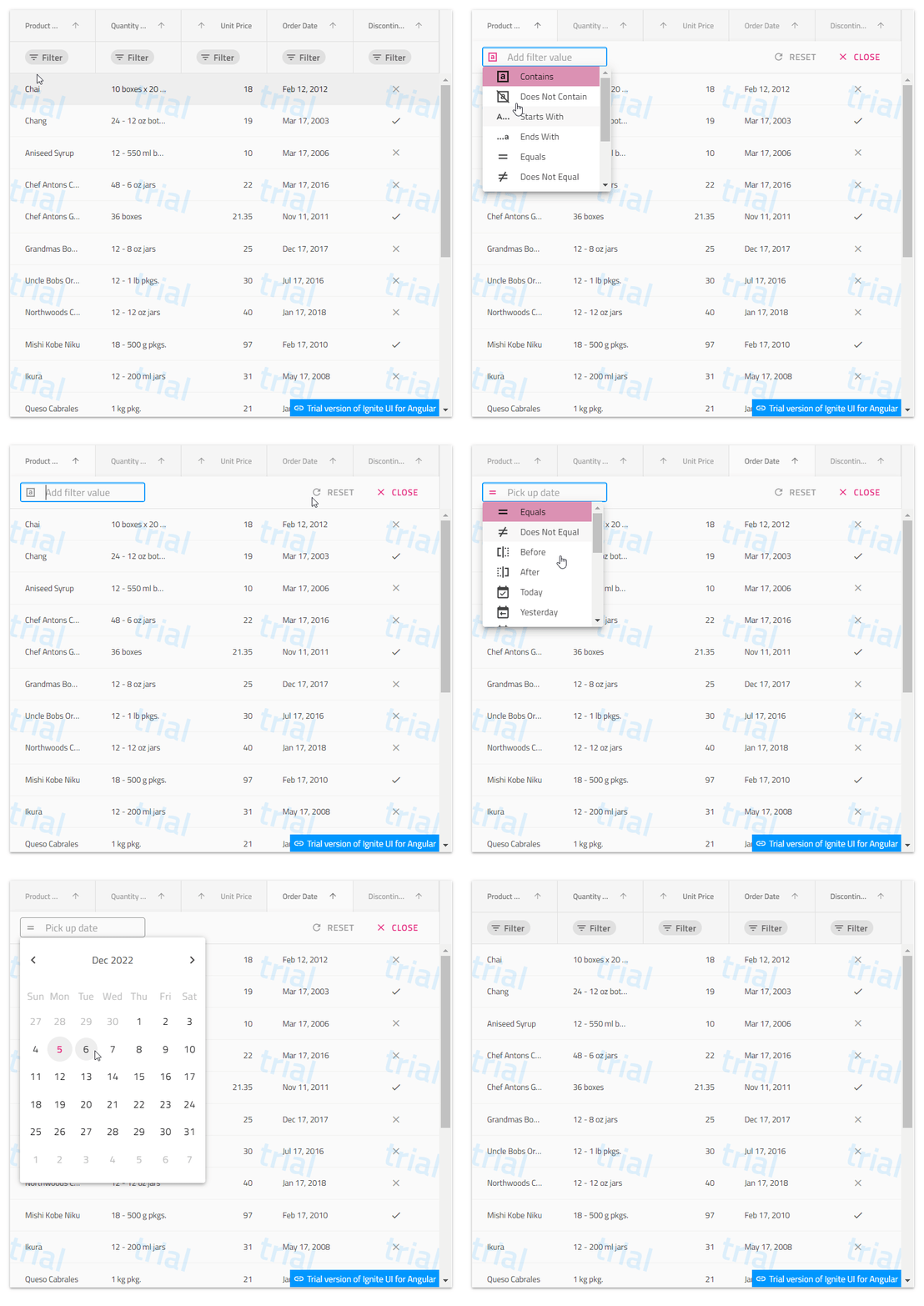
Excel style filter is good and it has got advance features. But in that,to do a simple search also user should do minimum 4 clicks.
Time being I have decided to go with below requirements.Only one drop down with search conditions for each column.

But in case of date column filter condition should change as below .I mean not the look and feel only conditions as shown below..Once user selects condition he should get date picker to select date.

Can you please help me on this.Don't we have any built in feature available which support this?
I don't want below template

-
0
Hello Roopesh,
Thank you for following up, for the additional information and the screenshots provided.
After further investigation, in fact, as you already understood from our correspondence, the templating of the given columns according to the initially set requirements is completely feasible with the igxFilterCellTemplate directive, on the other hand, however, your application and the custom logic that you have defined with the dynamic columns require the writing of many separate filtering templates for each column, which you said you were avoiding as a possibility.
After the new requirements are simplified and each filter does not need to select a value from the column, but only a condition, with dynamic columns, this again leads us to create many custom templates with different drop-down conditions for each column.
Аll this brings us to, the built in functionality of the igx-grid component – the quick filtering modе, best fits your description at the moment. It will provide the ability to select a condition, enter a value in an input field, select a date in a datatype column and all that is a maximum of 4 clicks as you expect.
What you need to do is set the allowFiltering property of the grid to true.
The described scenario with quick filtering and dynamic columns could be observed here:

I have prepared small sample illustrating my suggestion which could be found here. Please test it on your side and let me know how it behaves.
If you require any further assistance on the matter, please let me know.
Regards,
Georgi Anastasov
Entry Level Software Developer
Infragistics
-
0
Thanks for the response. But I think you misunderstood about my requirements. I have said that I don't want the below template

I want something as below
https://ghiscoding.github.io/Angular-Slickgrid/#/clientside

The filter which you have shown is not my client requirement.
-
0
Hello Roopesh,
After more further investigation what I have determined is that your requirements with the given custom logic for dynamic columns for the moment cannot be achieved because we do not offer such build in functionality.
The only option with which you can achieve your requirements is to implement your custom filtering at the application level. This is because you require for each column to have a drop–down from which to select the given condition, as well as an input field from which to filter. That's why many custom filtering templates must be created with the igxFilterCellTemplate directive and passed to the filterCellTemplate property of the columns for each column with its own drop-down, which expands so that a condition can be selected only for the given column, not for all. Separately, each custom filtering template will have its own input field with a function for filtering the column.
For the specific requirements this is the way it should be done and I have provided samples and code for you to refer to and use.
I could suggest that if you want to have this custom filtering in your application, you should change or adjust your custom logic with dynamic columns or in the database it should be saved which column which filtering template will use, and then when binding them, it should be taken from the database which predefined template to use. This still involves a lot of code writing because in your case the templates must be unique for each column.
Thank you for your cooperation.
Regards,
Georgi Anastasov
Entry Level Software Developer
Infragistics
-
0
Hello Roopesh,
I think you misunderstood me. What I want to explain and what you have seen from my previous answers and provided samples is that your requirements are feasible and Ignite UI Angular provides the possibility to create a custom template via the igxFilterCellTemplate directive and set it to a given column with the filterCellTemplate property of the columns.
As I have already explained, in your specific case, however, with your dynamic columns, to meet the requirements, everything will have to be write on the application side and a template with all drop-downs should be created that will set of the filterCellTemplate property. This template will have different suffixes according to the given column to display separate dropdowns for the conditions, for each column, so that a condition can be selected for each individual column, rather than one dropdown for all columns. After which there will be several different input fields for the different datatypes of the columns in the string and number, it will be possible to filter, in the datatype it will be possible to open a calendar for selecting a date, and in the boolean datatype it will be possible to select between true and false as per your requirements. After that it will also create different suffixes for each column's individual drop-downs for all values from it if you still require it.
The only way to achieve all this in any specific case is in the way I describe by writing different options for different drop down and input fields in one filter for all columns because that's how it should be. And you have to adjust this according to your custom logic and your database.
I have created a sample with four different data type columns – string, number, data, boolean. As we have dynamic columns on which I set a filter template and in it already according to the column with ngif directive (as you should set according to your custom logic and database) different suffixes are created with different icons that expand separate dropdowns with different conditions. After that, different input fields are created according to the datatype of a column – in string and number the column will be written and filtered – in datatype the column will be selected from calendar – and in boolean the column will be selected by value. After that follows the suffix with the different values from the given column, which in turn will be displayed by the sports column with the ngif directive.
The described scenario could be observed here:

In this way, your requirements as you can see are achieved. I understand that you may not know what columns will be bound to you in the grid, but then you will not know what custom filters to make for them, that's why you need to think of additional logic about the database and get information about which column is for to match the given filter with the given dropdowns and input fields. This is related to your custom logic, not the Infragistics components.
In addition, I have prepared sample illustrating this behavior which could be found here. Please test it on your side.
However, if you think this does not help you, you can submit feature request in our GitHub repository here.
Remember when submitting your idea to explain the context in which a feature would be used and why it is needed as well as anything that would prevent you from accomplishing this today. You can even add screenshots to build a stronger case.
This will give you the opportunity to directly communicate with our development team regarding the issue and get notifications whenever new information is available.
Thank you for your cooperation.
Regards,
Georgi Anastasov
Entry Level Software Developer
Infragistics
-
-
- You must be logged in to reply to this topic.
Suggested Discussions
Clearing Filter and Filter Text in igGrid
Hello, Within our grid, we are attempting to create a simple clear filter function. We’ve go…Data Filter on a right aligned column – want to left align just the filter cell
The filter in the price column has a very cramped area to enter data Try filtering prices greater t…igGrid Filter : how to hide filter menu condition options
I want to hide / remove some below condition options from filter menu, Next Month and Next year. Pl…Refresh filter dropdown values on data updated
I’ve got a WinGrid that updates the rows as the bound data is updated. I also have the filter…Tags
No tags
Created by
Created on
Dec 8, 2022 2:51 PM
Last activity on
Feb 25, 2026 9:49 AM